 Skip to content
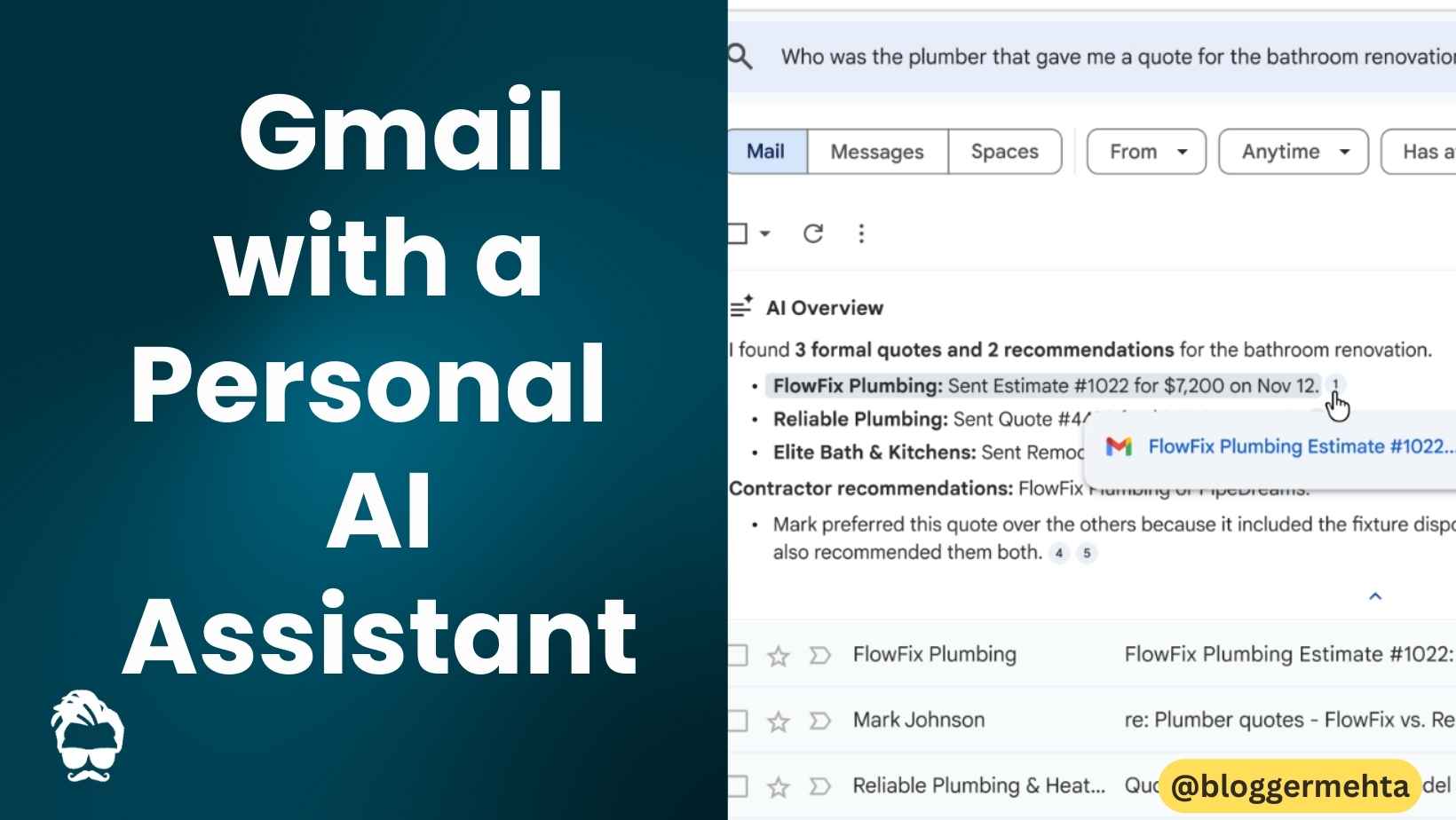
Google just pulled back the curtain on the next evolution of Gmail, unveiling a suite of AI‑powered tools that promise to turn a cluttered inbox into a personal assistant. With more than 3 billion monthly active users, Gmail is finally getting a “look‑inside” feature that does the heavy lifting for you: AI Overviews in search let you ask natural‑language questions and receive instant, citation‑backed answers without ever opening a single message, while the upcoming AI Inbox adds a dedicated view that surfaces actionable tasks, contextual topics, and a real‑time snapshot of everything you need to know—all powered by Google’s latest Gemini 3 model.
Imagine typing “Who gave me the plumbing quote for the bathroom remodel last year?” into the Gmail search bar and getting a concise, AI‑generated response that pulls the exact email thread, the quoted amount, and even the date—no scrolling, no keyword hunting. That’s the core promise of AI Overviews, rolling out today for Google AI Pro and Ultra subscribers, with free‑for‑all thread summaries hitting users’ inboxes within weeks.
And it doesn’t stop at answering questions. The AI Inbox—visible as a sparkle‑icon tab beside your classic mailbox—delivers a personalized briefing, flagging “Suggested to‑dos” like unpaid bills or upcoming meetings, and curating “Topics to catch up on” with bullet‑point context straight from your own correspondence. All of this runs inside Google’s newly announced engineered‑privacy environment, ensuring your private Workspace data never leaves the secure boundary, and giving you the option to toggle the smart features off at any time.
Contents
Stay tuned: the AI Inbox is currently in a trusted‑tester rollout, with broader availability slated for the coming months.
1️⃣ Why Gmail Needs an AI Upgrade
Gmail’s 3 billion+ monthly active users have turned the service into a universal hub for work, personal life, and everything in‑between. Yet the classic inbox experience still forces users to:
- Scroll through endless threads to locate a single piece of information.
- Manually copy, paste, and summarize details across multiple messages.
- Spend time proofreading long drafts that often slip through tone or clarity issues.
Google’s answer is to embed a personal assistant directly in the email client—one that can understand natural language, summarize and act on the content already stored safely in your account.
“We wanted Gmail to become a proactive partner, not just a mailbox,” said Megan Smith, VP of Product Management for Gmail, during the preview event.
2️⃣ AI Overviews – Instant Answers from Your Inbox
2.1 How It Works
- Open Gmail (web or mobile).
- Click the search bar – a subtle prompt now reads “Get answers from Gmail.”
- Type a natural‑language question, e.g.:
“Who quoted me for the bathroom remodel last year?” - Press Enter – Gemini 3 scans every message in your account, pulls relevant excerpts, and returns an AI‑generated overview right inside the search results pane.
The response includes:
- A concise answer (e.g., “John Baker from Aqua Plumbing quoted $2,850 on 12 Oct 2024.”)
- Citations linking directly to the original email threads (clickable, open‑in‑context).
- Optional “Show more” to expand the summary with additional context or related messages.
2.2 What’s New vs. Old Search
| Traditional Search | AI Overviews |
|---|---|
| Keyword‑based, returns a list of matching emails. | Natural‑language question, returns a single, synthesized answer. |
| No context beyond the matching snippets. | Full‑thread context, multi‑email reasoning, citations. |
| Users must open each email to verify details. | Answer appears immediately, with a one‑click path to the source. |
2.3 Availability
- AI Pro & Ultra subscribers receive the full AI Overview experience today.
- Free users will see thread‑summary cards when they open an email conversation (a lightweight version of the same technology).
Also Read: Google Photos Locked Folder Is Secure but Broken for Power Users
3️⃣ AI Inbox – Your Personal Briefing Board
3.1 Where It Lives
In the Gmail web UI, a sparkle‑icon tab labelled AI Inbox appears above the traditional Inbox list in the left navigation pane. Clicking it opens a brand‑new view that looks more like a dashboard than a mailbox.
3.2 Core Sections
| Section | What It Shows | Example |
|---|---|---|
| Welcome Snapshot | Greeting, total unread count, last refresh timestamp. | “Good morning, Abner – 23 unread messages (updated 2 min ago).” |
| Suggested To‑dos | Actionable items extracted from recent mail (bills, meeting invites, follow‑ups). | “🧾 Pay electric bill – $124, due May 5 (email from UtilityCo).” |
| Topics to Catch Up On | Non‑urgent clusters (project updates, newsletters) with bullet‑point highlights. | “📚 Marketing Campaign Q2 – 3 new drafts, 2 pending approvals.” |
| Recent Highlights | Quick blurbs from the most recent high‑priority email (e.g., a contract you just received). | “📄 New contract from Acme Corp – review and sign.” |
| Smart Filters | Buttons to jump straight to “Unread”, “Important”, or “Later” based on AI‑ranked relevance. | “Show me only messages that need a reply.” |
3.3 How AI Determines What’s Important
Gemini 3 analyses:
- Sender reputation (e.g., known contacts, frequent correspondents).
- Email content clues (keywords like “invoice,” “deadline,” “RSVP”).
- User behavior (which emails you’ve replied to or archived in the past).
The model then ranks each thread for actionability and surfaces the top‑ranked items in the “Suggested To‑dos” pane.
3.4 Rollout Timeline
- Trusted Testers (selected power users, enterprise admins, and early‑access developers) – live now.
- General Availability – slated for Q2 2026 for all Gmail accounts (free and paid).
4️⃣ Proofread – More Than a Spell‑Checker
4.1 Feature Overview
Powered by Gemini 3’s language‑understanding layer, Proofread works inside the compose window and offers:
| Suggestion Type | Example |
|---|---|
| Grammar/Spelling | “recieve → receive” |
| Tone | “Your request is urgent → Your request is important (formal tone) |
| Clarity | “We will be meeting at 2pm on Friday to discuss the quarterly results and the upcoming product launch” → “We’ll meet Friday at 2 p.m. to discuss quarterly results and the upcoming product launch.” |
| Conciseness | “In order to better understand the requirements, we would like to schedule a meeting” → “Let’s schedule a meeting to clarify requirements.” |
| Structure | Suggests splitting run‑on sentences or adding bullet points for readability. |
Each flagged segment is underlined (blue for style, red for grammar) and a hover tooltip offers a one‑click “Apply” button.
4.2 Availability
- AI Pro & Ultra (Web) – full Proofread suite today.
- Mobile – Google plans to roll it out to Android/iOS in late 2026.
Also Read: Google Pixel 8 & 8 Pro Get a Smarter Panorama Mode
5️⃣ Gemini 3 – The Engine Behind the Magic
Gemini 3 is Google’s third‑generation multimodal large language model. Compared with Gemini 2, it delivers:
- ~2× higher reasoning accuracy on email‑specific tasks (e.g., extracting dates, amounts).
- Improved contextual memory – it can reference up to 30 k tokens (roughly 20 k words) from your mail history when answering a query.
- Safety‑first training – fine‑tuned on a synthetic “engineered‑privacy” dataset that never contains real user data.
All AI Inbox and Overviews run inside Google’s new engineered‑privacy processing environment, a dedicated secure enclave that isolates user content from any model‑training pipeline.
“Your inbox stays yours. Gemini 3 sees it only to generate a response, and that data never leaves the encrypted perimeter,” emphasized Ravi Patel, Google’s Head of Privacy Engineering.
6️⃣ Privacy & Control – You’re Still the Boss
6.1 Engineered‑Privacy Processing
- Zero‑training policy – Your personal Workspace content is never used to improve Gemini models.
- On‑device‑like isolation – The AI service runs in a sandbox that can’t export raw email content.
- Data‑in‑flight encryption – TLS 1.3 is enforced for every request/response pair.
6.2 Opt‑Out Mechanics
- Open Settings → General → Smart Features.
- Toggle AI‑generated Overviews, AI Inbox, or Proofread off individually.
- Changes take effect immediately; the UI reverts to legacy behavior.
Pro tip: For enterprises using Google Workspace, admins can enforce a global opt‑out via the Admin console, ensuring compliance with corporate data‑policy mandates.
Also Read: Google AdMob Pharmaceutical Policy Update 2026
7️⃣ How to Start Using the New Features Right Now
7.1 AI Overviews (Web)
1. Open Gmail on any browser.
2. Click the search bar – you’ll see “Get answers from Gmail.”
3. Type a natural‑language query (e.g., “When did I schedule the product demo with Acme?”)
4. Press Enter → an AI Overview card appears at the top of results.
5. Click the citation link to jump straight to the source email.
7.2 AI Inbox (Web)
1. In the left navigation, locate the sparkle icon labeled “AI Inbox.”
2. Click it – the dashboard loads showing Suggested To‑dos, Topics, etc.
3. Use the “Mark as done” button on any To‑do to automatically archive the originating email.
4. Refresh any hour to see updated counts and new tasks appear.
7.3 Proofread (Compose)
1. Click “Compose” → start typing a draft.
2. As you type, watch for blue/red underlines.
3. Hover → click “Apply” to accept the suggestion.
4. Press Ctrl+Space (Windows) or ⌘+Space (Mac) to open the full Proofread sidebar for a complete review.
8️⃣ Real‑World Use Cases
| Scenario | Traditional Workflow | AI‑Powered Workflow |
|---|---|---|
| Finding a contractor quote | Search “contractor,” open 15 threads, scroll for the right attachment. | Query: “Who gave me a bathroom remodel quote in 2023?” → AI Overview shows contractor name, quoted amount, and attachment link. |
| Paying a bill | Look for “invoice,” verify amount, manually mark as paid. | AI Inbox lists “🧾 Pay electric bill – $124 (due May 5)” with a “Pay now” button that opens the attached PDF. |
| Composing a client update | Write a long email, then run a separate grammar checker. | Compose → Proofread flags run‑on sentences, tone, and suggests tighter phrasing, all without leaving the compose window. |
| Project status catch‑up | Open several project threads, read each for latest updates. | AI Inbox “Topics to catch up on” shows a bullet list: “Project X – prototype delivered, awaiting QA.” (click any bullet to open the related email). |
9️⃣ Potential Concerns & How Google Addresses Them
| Concern | Google’s Mitigation |
|---|---|
| Data leakage to AI training | Engineered‑privacy sandbox; explicit policy that no user content is used for model training. |
| Incorrect AI answers | Every Overview is citation‑linked; users can verify instantly. Google is also rolling out a “Report inaccurate answer” button. |
| Over‑reliance on AI, losing manual skills | Features are opt‑out-able; the classic search and view remain fully functional. |
| Performance impact on large mailboxes | Gemini 3 runs on Google’s high‑throughput, low‑latency backend; average response time < 1 sec even for > 100k‑email accounts. |
| Accessibility | Overviews are screen‑reader friendly, and AI Inbox includes ARIA tags and high‑contrast mode. |
What’s Next for Gmail?
- Voice‑first AI Queries – Early prototypes let you say “Hey Google, read me the latest updates from the marketing team.”
- AI‑Generated Follow‑Ups – One‑click “Reply with summary” that drafts a reply based on the most recent thread content.
- Cross‑Product Integration – AI Overviews will soon surface results from Google Calendar, Drive, and Meet when you ask multi‑service questions (“When is my next meeting with the design team and where are the files?”).
- Expanded Mobile Rollout – Full AI Inbox and Proofread to hit Android and iOS by Q4 2026.
Bottom Line
Google’s AI‑driven revamp of Gmail isn’t just a collection of flashy widgets—it’s a strategic shift that turns the inbox into an active knowledge hub. By letting users ask questions in plain language, receive instant, citation‑backed answers, and see a curated to‑do list without digging through countless threads, Gmail tackles the core pain points of email overload.
If you’re already an AI Pro/Ultra subscriber, dive in today: try a few natural‑language searches, explore the AI Inbox, and enable Proofread on your next draft. For free‑tier users, the upcoming thread‑summary cards will give a taste of the future, and the classic experience will stay intact for those who prefer it.
Bottom line: AI Overviews + AI Inbox = a smarter, faster, and more secure Gmail—and with Gemini 3’s powerful reasoning, the difference between “searching” and “finding” has finally been bridged.
Ready to let your inbox do the heavy lifting? Open Gmail, type a question, and watch the AI turn chaos into clarity.
Read in App ★ Free


