Skip to content
Choosing the right canonical URL is one of the most important yet misunderstood aspects of Search Engine Optimization. Many website owners often wonder why Google sometimes selects a different page as canonical—even when they specify one.
Recently, Google’s Search Advocate John Mueller shared detailed insights explaining how Google determines canonical URLs and why it may sometimes appear incorrect.
What Is a Canonical URL?
A canonical URL is the version of a webpage that Google considers the main or authoritative page when multiple pages have similar or duplicate content.
Webmasters can suggest a preferred URL using the rel=canonical attribute. However, this is only a hint, not a guarantee—Google may still choose a different version.
Also Read: Google Targets Back Button Hijacking With New Spam Penalty
Why Does Google Choose a Different Canonical URL?
According to John Mueller, Google uses multiple signals to decide which page should be treated as canonical. In many cases, what appears to be a mistake is actually due to overlooked technical or content issues.
9 Key Factors That Influence Canonical Selection
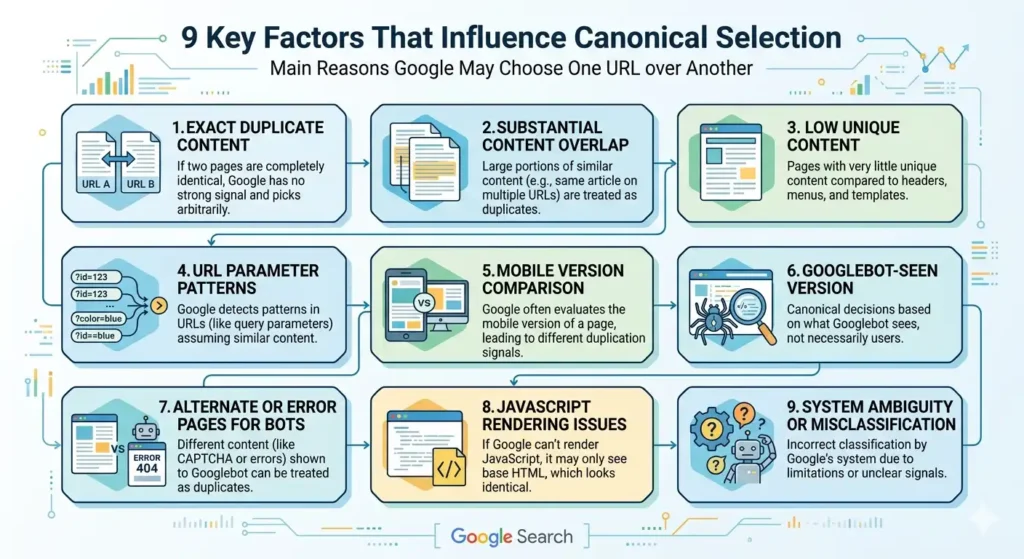
Here are the main reasons Google may choose one URL over another:
1. Exact Duplicate Content
If two pages are completely identical, Google has no strong signal to differentiate them and will pick one arbitrarily.
2. Substantial Content Overlap
When large portions of content are similar (e.g., same article published on multiple URLs), Google may treat them as duplicates.
3. Low Unique Content
If a page has very little unique content compared to repeated elements like headers, menus, and templates, it may be considered duplicate.
4. URL Parameter Patterns
Google may detect patterns in URLs (like query parameters) and assume similar URLs show the same content.
5. Mobile Version Comparison
Google often evaluates the mobile version of a page instead of desktop, which may lead to different duplication signals.
6. Googlebot-Seen Version
Canonical decisions are based on what Googlebot sees—not necessarily what users see.
7. Alternate or Error Pages for Bots
If your site shows different content (like CAPTCHA or error pages) to Googlebot, it may treat those as duplicates.
8. JavaScript Rendering Issues
If Google cannot properly render JavaScript content, it may only see the base HTML, which can look identical across pages.
9. System Ambiguity or Misclassification
Sometimes, Google’s system may incorrectly classify pages as duplicates due to limitations or unclear signals.
Also Read: Local SEO Playbook Audit, Optimize, and Rank Faster in Your Neighborhood
Why Canonical Issues Happen More Than You Think
John Mueller explained that canonical selection works like a “fuzzy matching system”, combining multiple signals such as:
- Content similarity
- URL structure
- Rendering behavior
- Crawled version of the page
Because of this, the system is not always perfect—but most mismatches are harmless and don’t significantly affect performance.
Important Takeaways for SEO Professionals
To ensure Google selects the correct canonical URL:
✔ Use rel=canonical correctly
✔ Avoid duplicate or thin content
✔ Ensure proper internal linking
✔ Optimize mobile and desktop versions
✔ Make sure Googlebot sees the correct content
✔ Fix JavaScript rendering issues
Final Thoughts
Canonical URL selection is not controlled by a single factor—it’s the result of multiple signals working together. Even though you can guide Google, the final decision is always algorithm-driven.
Understanding these nine factors can help you troubleshoot canonical issues and improve your site’s visibility in search results.
Read in App ★ Free