 Skip to content

If you’ve been scrolling through Shorts lately and wondered why the familiar thumbs‑down icon has vanished, you’re not imagining it.
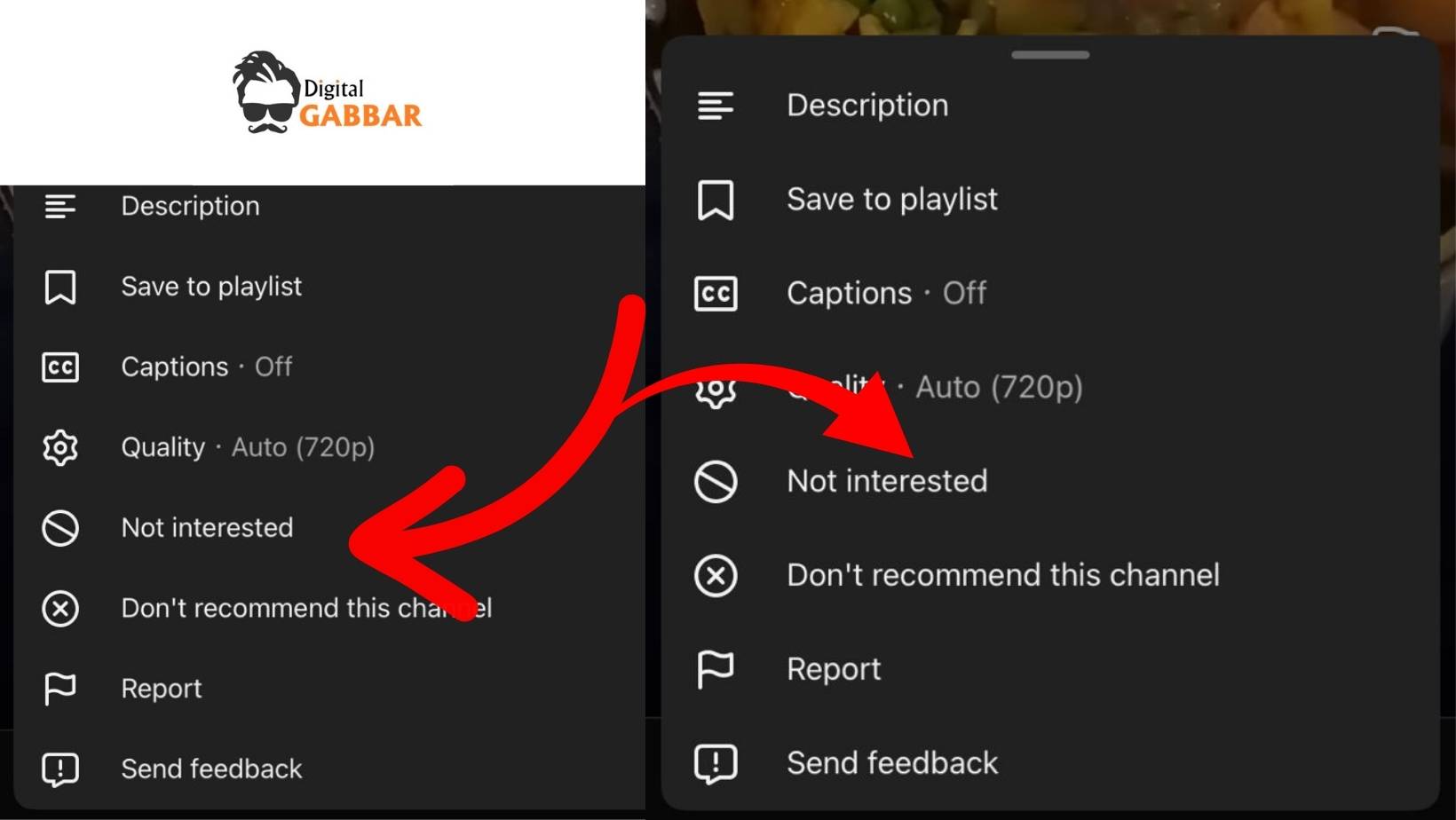
Google is quietly running an A/B test that tucks the “Dislike” action into the three‑dot overflow menu and swaps the classic label for a new “Not interested” phrasing. The goal? To make negative feedback more deliberate—and, ultimately, to help the algorithm serve you videos you actually want to see.
In this article we break down what’s changing, why it matters to viewers and creators, and what you can do right now to make your voice count.
- What you’re seeing: In some Shorts the familiar thumbs‑down icon has disappeared.
- What’s actually happening: YouTube is running an A/B test that moves the “Dislike” action into the three‑dot overflow menu and experiments with new copy (“Not interested”) next to or instead of the classic “Dislike”.
- Why it matters: The placement and wording affect how often users express negative feedback, which in turn influences Shorts recommendations, creator metrics, and ad‑placement decisions.
- What you can do now:
- Look for the overflow menu (⋮) on the top‑right of a Short to find the hidden dislike option.
- Choose the phrasing that feels most honest to you.
- After you act, you’ll be prompted for a quick survey – take it.
- Use the built‑in “Send feedback” option if you want to voice a stronger opinion.
1. The Backstory – YouTube’s Love‑Hate Relationship With Dislikes
| Year | Change | Rationale (from Google) |
|---|---|---|
| 2016 | Dislike counts made public | Encourage transparent community feedback. |
| 2021 | Dislike count hidden (public number removed, but personal dislike still possible) | Combat “dislike‑gaming” and protect creator mental health. |
| 2022‑23 | Explore alternate negative signals (e.g., “Not interested”, “I don’t like this video”) | Better map the nuance of “I don’t want more of this” vs. “I think this is bad”. |
| 2024 (Q3) | Testing new placement & wording in Shorts | Short‑form videos are a different consumption pattern; YouTube wants to see which UI drives meaningful negative feedback without hurting watch‑time. |
The latest test is the logical continuation of that trajectory. Google’s internal research (cited in the YouTube Support Forum post) tells us:
“Our viewers often use ‘Dislike’ and ‘Not interested’ interchangeably. By giving them both options in varied layouts we can see which signals help fine‑tune their personal algorithm the best.”
In short: It’s not about removing the dislike— it’s about how the dislike is expressed.
2. What Exactly Is Changing?
2.1 Placement: From Thumb‑Down to Overflow Menu
- Current (pre‑test) UI – A prominent thumbs‑up & thumbs‑down pair sits beneath the video (or to the right of the “like” in the classic desktop layout).
- Tested UI – The thumbs‑up stays visible. The thumbs‑down disappears from the primary row and lives inside the three‑dot overflow (⋮) at the top‑right of the Short’s playback screen.
Why hide it? YouTube hypothesizes that a “hidden” negative action might reduce impulsive disagreement taps, turning the signal into a more deliberate choice.
2.2 Wording: “Dislike” vs. “Not interested” (or a combo)
| Variant A | Variant B | Variant C |
|---|---|---|
| Dislike (thumb icon + text) | Not interested (plain text, no icon) | Not interested + thumbs‑down icon side‑by‑side |
- Variant A – Classic UI, keeps the long‑standing “Dislike”.
- Variant B – Replaces “Dislike” with a behavioral phrase, focusing on recommendation relevance rather than content quality.
- Variant C – Merges both, hoping to capture users who think in both terms.
2.3 Who Is Seeing It?
The test is device‑agnostic (both Android & iOS) but limited to a random sample of Shorts viewers. It appears to be rolled out gradually—some users see the traditional UI, others see one of the three variants.
Also Read: Google AdMob Pharmaceutical Policy Update 2026
3. The Potential Impact on Viewers
3.1 Positive Outcomes
| Benefit | Explanation |
|---|---|
| Less “dislike‑spam” | By moving the button, accidental taps are reduced, which could mean the dislikes you do leave are more thoughtful. |
| Clearer intent | “Not interested” directly tells the algorithm you don’t want similar content, which could improve your personal feed faster. |
| Cleaner UI | Shorts are already cramped; removing the thumb‑down frees visual space for the video itself. |
3.2 Possible Friction
| Pain Point | Why it matters |
|---|---|
| Hidden dislike | Users who rely on the thumb‑down to quickly signal offensive or low‑quality content may feel powerless. |
| Inconsistent experience | Switching between UI variants can be confusing – you may “like” a Short in one session, then not see the “dislike” button later. |
| Survey fatigue | An optional pop‑up after each action can feel intrusive if you’re scrolling through a binge session. |
3.3 Quick Tips for Viewers
- Don’t panic if the thumb‑down disappears – Look for the overflow menu (⋮).
- Pick the phrasing that matches your mental model – If “Not interested” feels more like “I don’t want more of this”, use it; if you want to call out bad content, use the traditional “Dislike”.
- Give feedback – The brief survey after you act is the fastest way to tell Google what works for you.
- Use the “Send feedback” button (Settings → Help → Send feedback) for more detailed thoughts.
4. What Creators Should Know
4.1 Dislike Counts Are Still Hidden
Just as on regular videos, the public dislike count remains invisible. Creators can still see the total number of dislikes in YouTube Studio under Analytics → Feedback (if they have the “Show count to owners” setting enabled).
4.2 Algorithmic Signals May Shift
- Negative feedback weight: Historically, a dislike had a modest impact on recommendation ranking for Shorts—mostly signaling quality issues.
- New “Not interested” signal: If YouTube decides the “Not interested” phrasing is more predictive of relevancy, that metric could get a higher weight.
- Mixed UI data: During the test, YouTube will compare how many users click each variant. Whichever yields more actionable data (i.e., leads to a measurable drop in watch duration for the offending Short) may become the default.
Bottom line for creators: Keep an eye on the Audience Retention chart after a dislike surge. If the “dislike” spike corresponds with a steep drop‑off, it might indicate that the new signal is having a larger algorithmic impact.
4.3 Practical Steps for Creators
| Action | Why it helps |
|---|---|
| Monitor the “Feedback” tab in YouTube Studio | Spot spikes in dislikes or “Not interested” selections early. |
| Read comments carefully | When the UI hides the thumb‑down, viewers may articulate their concerns in the comment section. |
| Experiment with content | If a subset of Shorts repeatedly receives “Not interested”, test alternate thumbnails, titles, or hook angles. |
| Engage with your community | Let loyal viewers know you welcome honest feedback, regardless of the button’s location. |
| Stay updated on policy | YouTube often releases guidance when UI changes affect community guidelines enforcement. |
Also Read: WhatsApp Introduces Passkey Support for Encrypted Backups
5. The Bigger Picture – What This Test Says About YouTube’s Direction
5.1 A Move Toward Behavioral Feedback
Instead of a binary “like/dislike” that judges quality, “Not interested” is an intent signal. This aligns with the broader industry trend (TikTok, Instagram Reels) where the algorithm cares more about what you want to see next rather than what you think is good.
5.2 Balancing Creator Well‑Being & Platform Health
YouTube’s 2021 decision to hide dislike counts was driven by creator mental‑health concerns. This new test seems to be a middle ground: keep the negative signal (so the algorithm can weed out bad experiences) but remove the public display and make the action less conspicuous.
5.3 Potential Future Scenarios
| Scenario | What it could look like |
|---|---|
| Dislike → “Not interested” only | The thumb‑down vanishes completely; all negative feedback is captured via “Not interested”. |
| Separate “Report” & “Dislike” flows | “Dislike” stays for low‑quality content, while “Not interested” handles relevance. |
| Contextual prompts | YouTube could ask “Why not interested? (Spam, Repetitive, Not my style)” to add richer data. |
| User‑controlled UI | A settings toggle that lets you choose which negative feedback button you’d like to see. |
6. How to Keep Your Voice Heard
- Participate in the Survey – It appears right after you select either “Dislike” or “Not interested”. A single click helps shape the final UI.
- Use the In‑App “Send Feedback” – Go to Profile → Settings → Help & feedback → Send feedback; describe whether you find the hidden button helpful or frustrating.
- Engage on the YouTube Support Forum – The original post is still open; threads with high up‑votes often get noticed by product managers.
- Spread the word – Write a tweet, a Reddit post, or a short video about the change. The more data points Google receives, the faster they’ll converge on a solution.
7. Recap
YouTube is quietly moving the Shorts “Dislike” button into the overflow menu and testing new wording like “Not interested”. This may make your negative feedback a more deliberate, algorithm‑friendly signal—so look for the three‑dot menu, choose the phrasing that matches your intent, and don’t forget to fill out the quick survey when prompted.
Final Thought
Whether you love the cleaner look or miss the instant thumbs‑down, this experiment is a reminder that UI elements you take for granted are constantly being refined to serve both creator welfare and user personalization. By understanding the why behind the change, you can make smarter choices about the feedback you give—and creators can adapt their Shorts strategy accordingly.
Happy watching, and may your Shorts feed stay as relevant as possible!
Read in App ★ Free


